An unhandled exception of type 'System.Management.Automation.CmdletProviderInvocationException' occurred in System.Management.Automation.dll

An unhandled exception of type 'System.Management.Automation.CmdletProviderInvocationException' occurred in System.Management.Automation.dll Additional information: Index was outside the bounds of the array
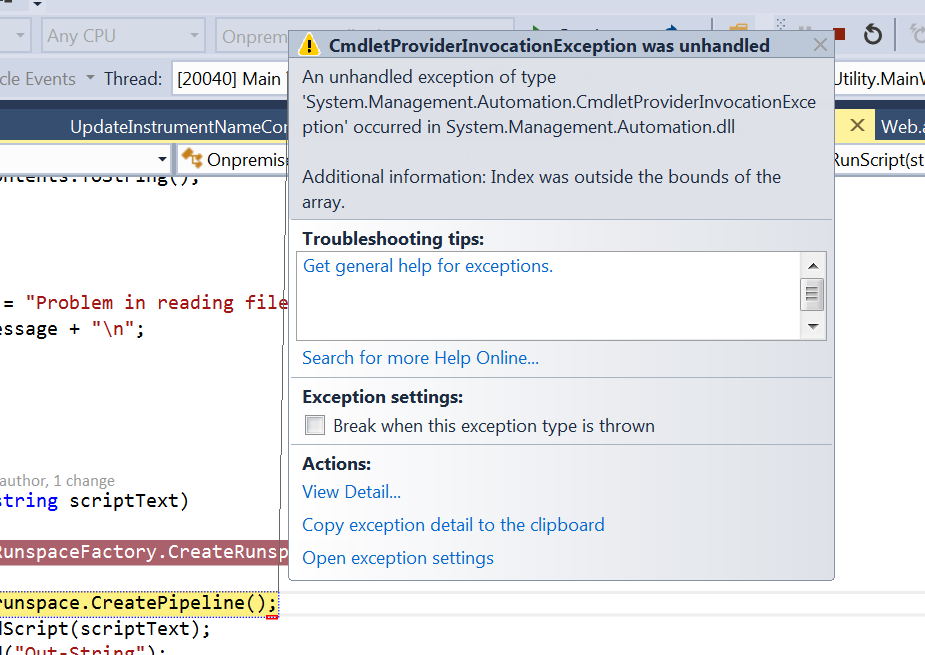


>> once you try to load power shell script through c# program, some times you may get this generic error
     and if you go to the stack trace you will get the error details

    Attempting to perform the NewItem operation on the 'WebAdministration' provider failed for the path
    '\\\\server-  name\\Sites\\websitename'   Index was outside the bounds of the array.

   If you debug the application you will find difficulty  to figure out the route cause, I have faced this issue an as per my research in google got the solution so thought of posting it in blog

Solution : If you are trying to create new website using powershell and the IIS dosenot have any default website you will get this error message

by default default website will be there, if you remove that by mistake you will get this message, So resolution is add one dummy website.


How to check SMTP configuration status in Windows Server

For checking the status of SMTP server you need to install Telnet client in your server. If you have not done that please check this post Ref
Step 1:
press Windows+R shortcut it will open run terminal type the following command and it will redirect you to Telnet Terminal.

“Telnet localhost 25” or Telnet yourip 25
Then it will redirect you to the Telnet terminal

Step 2:
Type the following commands and check you are able to send emails using smtp.
Command 1: HELO server
Command 2:mail from:tony@tony.com
Command 3:rcpt to:shine@android.com
Command 3:data
Command 4:content .

Step 3:
check the recipient able to receive email through our smtp.


How to Configure SMTP on Windows Server 2008

Hi Folks I am new to SharePoint and I have done this SMTP configuration and outgoing mail sending set up for my new project. I have done this using lots of researching in web, I would like to share what I have learned, so those who want to do the same it will be a help.
I am going to explain it in 2 steps.
Step 1:
go to server manager(Administrative Tools>Server Manager)
click on features menu in the LHS,then you can see the add features button click on that then it will a open a window like this.
Select the SMTP server from it and Install it. for checking SMTP configuration we need telnet client also so please install that one also.
Step 2:

Then go to  IIS 6 Manager, you can see the SMTP virtual server, please start the server if its not started
Go to properties of the SMTP virtual server and it will open a window like this

select your IP address in that drop down box,go to access tab>inside authentication check anonymous access is checked or not.
Now Click on the relay tab It will open a window like this, check the options you have selected correctly or not.

Save all settings Now you have successfully configured your SMTP server.
verify your SMTP configuration is working or not.