


.net core configuration in visual studio 2015, Hello world in .net core
Microsoft's powerful open source development platform .net core is the new trending technology in the tech market, so if you have visual studio 2015 you can do the development in easy updates.
So I will be explaining the steps required to configure the .net core in visual studio 2015.
 1. download the visual studio update for 2015: download
If you don't have the visual studio 2015: download
2. Download the .net core tool for the visual studio: download
I hope you have downloaded and installed all the above items, now we are good to go to the next step
So let us create a hello world console application using .net core
Select the new project option from vs you can see the .net core option under C#
select the console application and create one project with that

now you can just write the code in the same way you used to write with C#
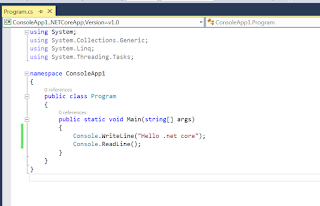
The DLL generated in windows machine for this application you can run in Mac/Linux it will give you the same result.
you can check more details here :details
So I will be explaining the steps required to configure the .net core in visual studio 2015.

If you don't have the visual studio 2015: download
2. Download the .net core tool for the visual studio: download
I hope you have downloaded and installed all the above items, now we are good to go to the next step
So let us create a hello world console application using .net core
Select the new project option from vs you can see the .net core option under C#
select the console application and create one project with that

now you can just write the code in the same way you used to write with C#

The DLL generated in windows machine for this application you can run in Mac/Linux it will give you the same result.
you can check more details here :details


